
ChoreReward: Family Habits
Kidslox, Inc.Parenting
4.24.00 Reviews
- Version
- 1.9.0
- Installs
- 100.00K
- Age Rating
- Everyone
Screenshots

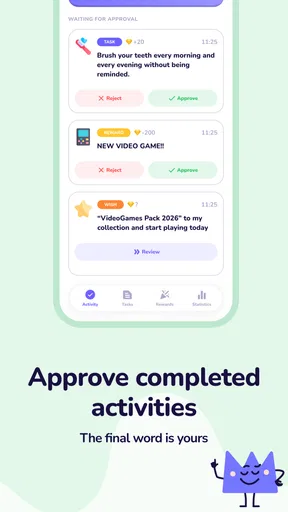
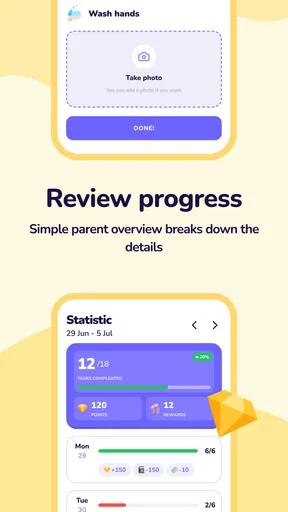

Our Review of ChoreReward: Family Habits
 Analysis by Appyee
Keeping family routines on track sounds simple until everyone is moving in a different direction. One child forgets a morning task, another wants a reward immediately, and parents end up repeating the same reminders. ChoreReward: Family Habits takes a more structured approach by turning chores, routines, rewards, and allowance into one shared family experience. I found its main appeal in making expectations visible instead of leaving them buried in spoken reminders.
This is a parenting app from Kidslox, Inc., aimed at families who want children to take a more active role in everyday responsibilities. It is free to start, rated for Everyone, and available for devices running at least version 12 of its operating system. The app has reached over 50 thousand installs and holds a perfect 5.0 average from just over 100 ratings, which suggests a small but very positive user base. Its current version is 1.5.0.
How ChoreReward turns family expectations into a shared routine
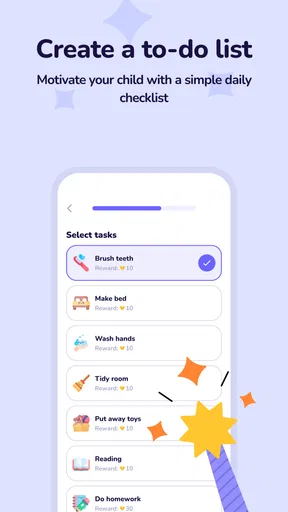
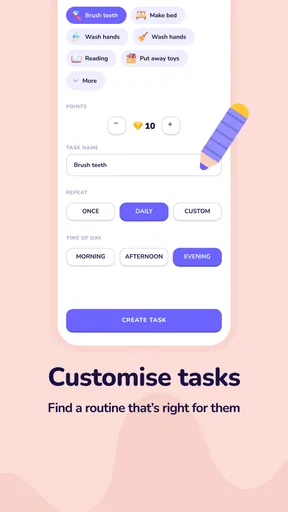
The basic idea is easy to understand: parents define responsibilities, children work through them, and progress can connect to rewards or allowance. That sounds close to a digital chore chart, but the useful difference is that the app brings several parts of the routine together. A chore is not treated as an isolated checkbox; it can sit alongside habits, daily structure, and broader family progress.
I like that approach because children often struggle less with the task itself than with remembering when it belongs in the day. A paper chart may show that a bedroom needs tidying, but it does not always help a child understand whether that happens before school, after dinner, or before screen time. A routine-focused app can make the order and timing of expectations clearer, provided the parent takes time to set it up thoughtfully.
The app is best viewed as a conversation aid rather than a replacement for parenting. It can show what was agreed, what remains unfinished, and how effort connects to a reward. It cannot decide whether a task was done properly, explain why a family rule matters, or resolve a disagreement between siblings. Those parts still require a parent’s judgement.
The first setup matters more than the reward system
My strongest advice is to begin with a small routine rather than entering every household responsibility at once. Start with a few repeatable tasks that a child can complete without constant help. For example, a morning sequence might include getting dressed, putting pajamas away, and preparing a school bag. A short list makes the system feel achievable and gives the child a clear early win.
Adding too many chores can turn the app into another source of pressure. Children may see a long queue and focus on earning the final reward instead of building the habit. I would also avoid attaching a monetary allowance to every tiny action. Some responsibilities are simply part of living together, while larger or less frequent jobs may be better candidates for an allowance discussion.
This is one of the less obvious trade-offs of ChoreReward: its flexibility can help different families, but it also places responsibility on the parent to design a fair system. If every task has a separate prize, the routine may become transactional. If nothing feels meaningful, children may ignore it. The app provides a framework; the quality of the framework depends on the rules you create.
Where connectivity becomes part of the experience
Because this is a family coordination tool, connectivity matters most when information needs to move between people. A parent may update a responsibility, a child may complete an item, and another family member may want to see progress. These moments are more useful when everyone is looking at current information rather than relying on an old screenshot or a paper note.
That also means I would treat a stable connection as part of the smoother experience, especially when setting up the family, changing routines, or checking progress at a busy time. If a child marks a task while moving between rooms or leaving the house, the practical question is whether the update appears consistently for the people who need to see it. Families should allow a little patience when switching between weak home Wi-Fi and mobile data instead of assuming that a delayed display means the task disappeared.
I would not build a family system around an assumption that every function works without an internet connection. The safer habit is to make important changes while connected and to check that the shared routine reflects those changes before relying on it. For a simple daily chore, a temporary delay is usually manageable. For a reward decision or a family meeting, it is better to confirm the latest status first.
This connectivity angle also affects how parents introduce the app. If the first setup happens during a rushed school morning, an interruption can make the whole system feel unreliable. I would configure the family at home, with time to review the responsibilities and explain them to the children. Once everyone understands the routine, occasional connection friction is less likely to derail the habit.
Using it on phones without making family life feel digital
The mobile format suits the moments when children actually need reminders: before school, after activities, or during the evening cleanup. A phone is already close at hand, so checking a routine can be quicker than finding a paper chart hidden behind a door. For parents, mobile access can also make it easier to adjust a responsibility when the family schedule changes.
Still, a phone can introduce distractions. A child who opens the app to check a chore may be tempted by other apps, messages, or games. I would keep the interaction short and make the physical action the focus. The child should look at the task, put the phone down, complete the responsibility, and return only when it is time to record progress.
For younger children, the parent may need to guide the process at first. A digital checklist does not automatically make a task age-appropriate. If a child cannot read the wording comfortably or does not understand what “tidy the room” means, the parent should break that instruction into visible actions. “Put books on the shelf” is easier to verify than a vague command covering an entire room.
Older children may appreciate more independence, but I would still agree on a review rhythm. A parent does not need to inspect every item immediately. A short evening check can be enough to discuss what went well, what was difficult, and whether the routine needs adjusting. This prevents the app from becoming a tool for constant surveillance.
One useful mobile habit is to create routines around transition points rather than arbitrary times. Completing a task after breakfast or before bedtime is often easier to remember than completing it at a precise minute. This makes the system fit real family life, where school buses run late and dinner does not always happen on schedule.
Rewards, allowance, and the motivation question
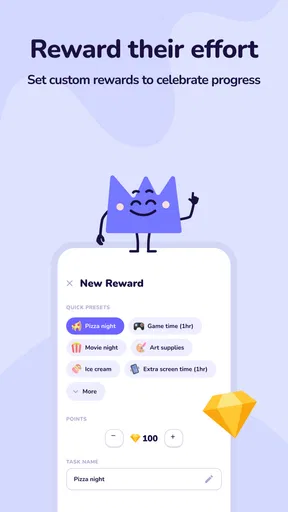
The reward structure is likely to be the feature that attracts most families, but it deserves careful handling. Rewards can help a child start a new habit, particularly when the task feels boring or unfamiliar. They work less well when they become the only reason a child contributes at home.
I would use rewards as a bridge toward consistency, not as a payment for every act of basic cooperation. A family might agree that routine personal responsibilities are expected, while extra jobs contribute toward a chosen privilege or allowance. That distinction teaches a more useful lesson: everyone helps because they are part of the household, while additional effort can be recognized separately.
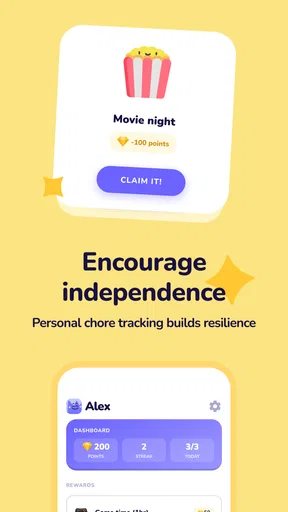
The app’s allowance angle may be especially useful for parents who want to make money discussions more concrete. Rather than promising a vague amount at the end of the week, the family can connect progress to a clear agreement. The important word is agreement. Parents should explain what counts as complete, when the review happens, and whether a missed chore can be made up.
Connectivity can create a small but important complication here. If a child believes a completed task has been recorded but the parent sees an older status, the disagreement can become emotional. I recommend treating the app as a record to discuss, not an unquestionable referee. Before confirming an allowance or reward, both sides should look at the same current information and resolve any mismatch calmly.
In-app purchases range from $3.99 to $49.99 per item, so families should pay attention before committing to anything beyond the free starting point. The free price makes it reasonable to test whether the routine actually works for your household. I would not pay for additional access simply because the idea sounds promising; first see whether the children use the system consistently and whether the parent saves enough effort to justify spending more.
What happens when a routine breaks
No family routine survives every holiday, illness, school event, or late evening. The real test is not whether ChoreReward prevents disruption, but whether it helps the family recover without turning one missed task into a failed week.
When a child misses an item, I would avoid adding several replacement chores at once. Instead, review why it happened. Was the task unclear? Was the routine scheduled at an inconvenient point? Did the child lack the required materials? Was the phone unavailable? This kind of diagnosis is more useful than simply increasing the punishment.
A practical recovery workflow is to pause and simplify. Keep the essential responsibility, remove an unnecessary extra, and restart at the next natural transition. If the family has been traveling, for example, it may be better to create a temporary light routine than to expect the normal schedule to resume immediately. The app can support the visible structure, but the parent still needs to decide when flexibility is appropriate.
Connection problems deserve the same calm treatment. If an update seems delayed, avoid entering the same completion repeatedly or changing the reward immediately. Check the connection, reopen the relevant view, and compare the status with the child’s account of what happened. Duplicate actions or rushed edits can create more confusion than the original interruption.
This is another reason I would keep the first routine small. A simple system is easier to repair. If a family has dozens of tasks, multiple rewards, and several exceptions, it becomes harder to tell whether a problem comes from the child, the schedule, or the way the system was configured.
Privacy-minded habits for a family app
Parents should think about data-conscious use even when an app feels private because it is intended for the household. I would keep entries focused on practical responsibilities rather than adding sensitive personal details to chore names or notes. A task can say “feed the dog” without including information about when the family will be away from home.
It is also sensible to use the minimum number of family accounts and permissions needed for the routine you actually want. Children need understandable responsibilities, while parents need oversight; not every family member has to manage every setting. Clear roles reduce accidental changes and make it easier to explain who can approve a reward.
Notifications and shared screens deserve attention too. A reminder about a chore may be harmless, but an allowance amount or a personal family note could be visible to someone nearby. I would review what appears on lock screens and avoid discussing sensitive financial details through a device that other people regularly use.
Families should also make a habit of reviewing the app’s current privacy and account options before expanding use. This is not a reason to avoid ChoreReward; it is simply good practice for any tool that organizes information about children and household behavior. The most data-conscious setup is usually the simplest one: clear tasks, limited personal detail, and only the family members who need access.
Who will benefit most, and who should skip it
I think ChoreReward is a strong fit for parents who are tired of repeating reminders and want a shared visual structure for chores and routines. It should also appeal to families experimenting with allowance because it gives them a place to connect effort, progress, and reward discussions rather than keeping everything in memory.
It may be particularly helpful when children respond well to visible progress. Some kids gain confidence from seeing a sequence of completed responsibilities, while others find any tracking system irritating. The app cannot make every child enjoy chores, so parents should watch the child’s reaction during the first week and adjust the system instead of insisting on it unchanged.
I would be more cautious about recommending it to families who prefer a completely offline, paper-based routine or who do not want a child’s responsibilities mediated through a phone. A basic whiteboard may be faster for a household where everyone is usually in the same room. A shared calendar may be better when the main challenge is appointments rather than chores. A dedicated allowance method may suit parents who want to teach money management without tracking every household task.
It is also not the right answer for parents looking for automatic enforcement. ChoreReward does not remove the need to teach, demonstrate, inspect, encourage, and occasionally renegotiate. If the family is dealing with serious conflict around responsibilities, a checklist alone will not solve the underlying issue.
My verdict after looking at the everyday trade-offs
What I appreciate most about ChoreReward is its attempt to connect the practical pieces of family organization: habits, chores, routines, rewards, allowance, and a sense of shared progress. That combination is more useful than a bare list when a family needs both structure and motivation.
The main weakness is that the app’s success depends heavily on thoughtful setup and consistent family agreement. A poorly designed routine can feel like digital nagging, and a reward system that is too detailed can distract from the responsibility itself. Connectivity also deserves realistic expectations: shared updates are most dependable when the family makes changes and checks progress while connected, and interruptions should be handled patiently rather than treated as proof that the system has failed.
For a family willing to start small, explain the rules, and review the routine together, the free entry point makes ChoreReward worth trying. I would begin with one morning or evening sequence, use rewards sparingly, and observe whether the app genuinely reduces reminders after the novelty fades. If it does, the structure can grow with the family. If a paper chart already works or phone-based tracking creates more tension than help, choosing the simpler alternative is the better decision.
Overall, I see this parenting app as a practical coordinator rather than a magic motivator. It works best when technology stays in the background and the family uses it to make expectations clearer, recover from missed tasks, and celebrate steady effort. That balance is what determines whether it becomes a helpful household habit or just another app installed with good intentions.
Privacy and Permissions
See what permissions an app requests and how it handles your data.
- Photos/Media/Files
- read the contents of your USB storage, modify or delete the contents of your USB storage
- Storage
- read the contents of your USB storage, modify or delete the contents of your USB storage
- Other
- view network connections, full network access, run at startup, control vibration, prevent device from sleeping, Google Play license check, read Google service configuration
Verdict
Strengths of ChoreReward: Family Habits
- Turns household chores into clear, trackable family goals.
- Reward system can motivate children to build consistent habits.
- Parents can customize tasks for different ages and abilities.
- Shared progress makes responsibilities easier to discuss as a family.
- Simple visual feedback helps children understand their achievements.
Limitations of ChoreReward: Family Habits
- Younger children may need parental help to use the app correctly.
- Reward systems may reduce motivation when incentives are removed.
- Requires regular updates to keep chores and completed tasks accurate.
- Some families may find constant task tracking time-consuming.
- Features may feel limited for households needing advanced scheduling tools.
Other Releases by Kidslox, Inc.
View All
Parental Control - Kidslox
Parenting4.0
Similar Picks in This Category
View All
Family Space
Motorola Mobility LLC.3.9

شرطة الأطفال - مكالمة وهمية
Oub Apps4.1

Findmykids: Parental Control
LETEM LTD4.6

Pregnancy + | Tracker App
Philips Electronics UK Limited4.8

Policía de niños - para padres
Kids police4.7

Pregnancy App
Amila4.9
Frequently Asked Questions
What is ChoreReward: Family Habits and who is it designed for?
ChoreReward: Family Habits is a family organization app designed to help parents assign household chores, encourage children to complete responsibilities, and build consistent daily habits. Parents can use it to create tasks, monitor progress, and provide rewards, while children receive a clearer understanding of what is expected from them. It is best suited to families looking for a more structured and motivating alternative to verbal reminders.
How does the chore and reward system work?
The app generally works by allowing parents to create chores or habits, set schedules or expectations, and mark tasks as completed. Children can then view their responsibilities and track their progress. Parents may connect completed chores with rewards chosen for their household, such as points, privileges, or other incentives. Before downloading, families should decide together how rewards will be defined so the system remains fair, understandable, and motivating rather than becoming a source of arguments.
Can multiple children and parents use the same family account?
ChoreReward: Family Habits is intended for family use, so it is important to check how profiles, invitations, and permissions are handled on your device and in the current version of the app. A household may need separate parent and child profiles to keep responsibilities organized and protect administrative controls. If several children use the app, individual task lists and progress tracking can make it easier to avoid confusion and recognize each child’s effort fairly.
Is ChoreReward: Family Habits suitable for younger children?
The app can be useful for children who are old enough to understand simple instructions and follow a routine, but its suitability depends on the child’s reading ability, independence, and comfort using a phone or tablet. Younger children may still need parental guidance to check tasks and record completion. Parents should also consider screen-time limits and explain that the app supports responsibility; it should not replace supervision, encouragement, or age-appropriate expectations.
Does ChoreReward: Family Habits require an internet connection or contain in-app purchases?
The exact online requirements and pricing can vary according to the platform and app version, so users should review the Google Play or App Store listing before installing. Check whether an account, cloud synchronization, subscriptions, advertisements, or optional in-app purchases are included. It is also worth reviewing the privacy details, especially when children’s names, routines, or family activity data may be stored or shared through the service.
